Manage networks
Manage networks in your Vanilla JavaScript or Wagmi dapp. With MM Connect, you can:
- Detect the current network and monitor network changes.
- Switch between networks programmatically.
- Add new networks to MetaMask.
- Handle common network-related errors.
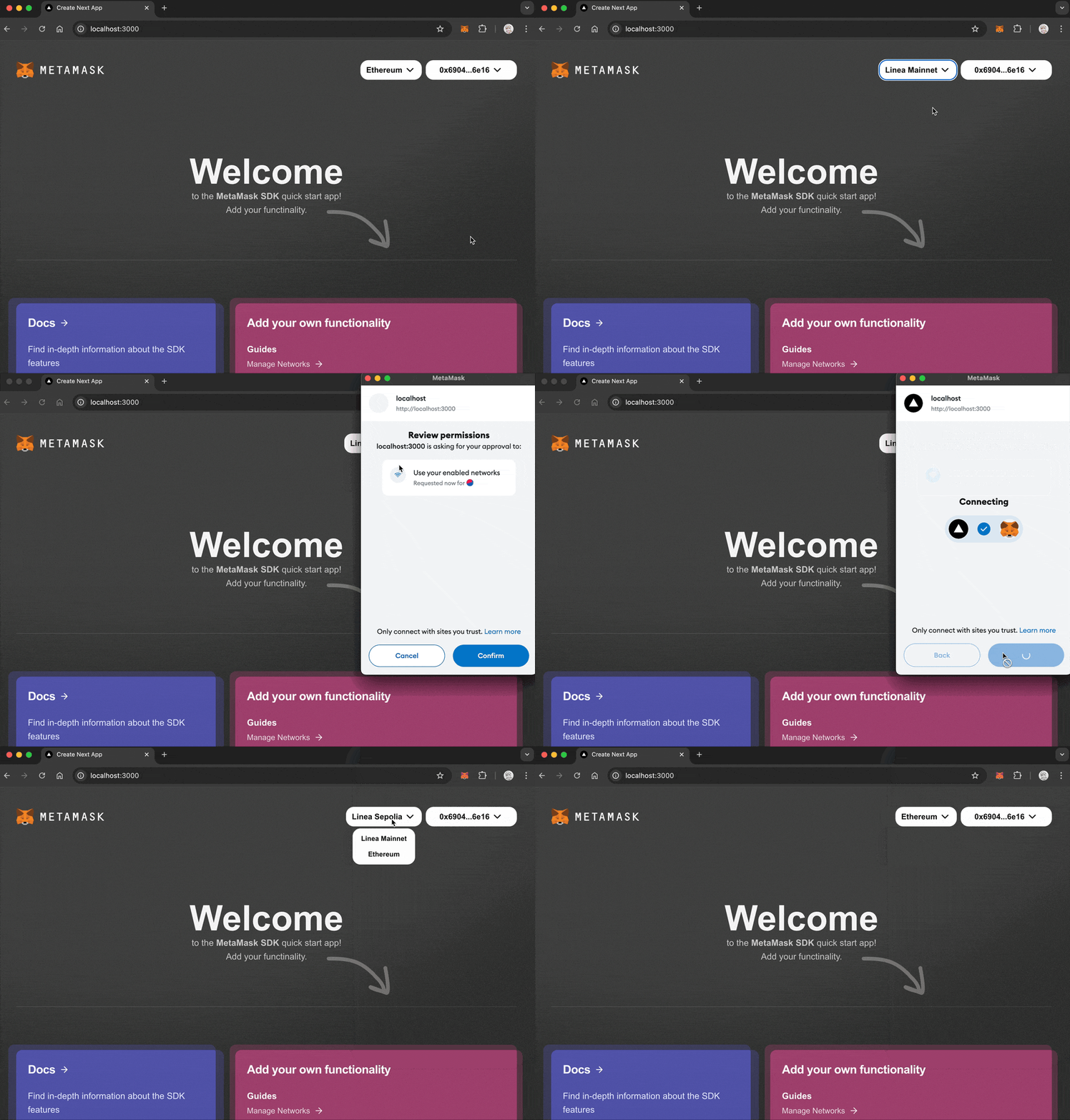
Detect and switch networks
Wtih Vanilla JavaScript, you can implement network management directly using the
eth_chainId RPC method and
chainChanged provider event.
With Wagmi, you can use provided hooks for several network-related operations.
Start by detecting the current network:
- Vanilla JavaScript
- Wagmi
import { createEVMClient } from '@metamask/connect/evm'

const evmClient = createEVMClient()
const provider = evmClient.getProvider()

// Get current chain ID
async function getCurrentChain() {
  try {
    const chainId = await provider.request({
      method: 'eth_chainId',
    })
    console.log('Current chain ID:', chainId)
    return chainId
  } catch (err) {
    console.error('Error getting chain:', err)
  }
}

// Listen for network changes
provider.on('chainChanged', chainId => {
  console.log('Network changed to:', chainId)
  // We recommend reloading the page
  window.location.reload()
})
Switch networks using the
wallet_switchEthereumChain
and wallet_addEthereumChain
RPC methods:
// Network configurations
const networks = {
  mainnet: {
    chainId: '0x1',
    name: 'Ethereum Mainnet',
  },
  optimism: {
    chainId: '0xA',
    name: 'Optimism',
    rpcUrls: ['https://mainnet.optimism.io'],
    nativeCurrency: {
      name: 'Ethereum',
      symbol: 'ETH',
      decimals: 18,
    },
    blockExplorerUrls: ['https://optimistic.etherscan.io'],
  },
}

async function switchNetwork(networkKey) {
  const network = networks[networkKey]

  try {
    // Try to switch to the network
    await provider.request({
      method: 'wallet_switchEthereumChain',
      params: [{ chainId: network.chainId }],
    })
  } catch (err) {
    // If the error code is 4902, the network needs to be added
    if (err.code === 4902) {
      try {
        await provider.request({
          method: 'wallet_addEthereumChain',
          params: [
            {
              chainId: network.chainId,
              chainName: network.name,
              rpcUrls: network.rpcUrls,
              nativeCurrency: network.nativeCurrency,
              blockExplorerUrls: network.blockExplorerUrls,
            },
          ],
        })
      } catch (addError) {
        console.error('Error adding network:', addError)
      }
    } else {
      console.error('Error switching network:', err)
    }
  }
}
Display the current network and a switch network button in HTML:
<div>
  <div id="networkStatus">Current Network: Loading...</div>
  <button onclick="switchNetwork("mainnet")">Switch to Mainnet</button>
  <button onclick="switchNetwork("optimism")">Switch to Optimism</button>
</div>
import { useChainId, useChains } from 'wagmi'

function NetworkStatus() {
  const chainId = useChainId()
  const chains = useChains()

  const currentChain = chains.find(c => c.id === chainId)

  if (!currentChain) {
    return <div>Not connected to any network</div>
  }

  return (
    <div>
      <div>Connected to {currentChain.name}</div>
      <div>Chain ID: {chainId}</div>
      <div>Supported chains: {chains.map(c => c.name).join(', ')}</div>
    </div>
  )
}
Switch networks:
import { useSwitchChain } from 'wagmi'

function NetworkSwitcher() {
  const { chains, switchChain } = useSwitchChain()

  return (
    <div>
      {chains.map(chain => (
        <button key={chain.id} onClick={() => switchChain({ chainId: chain.id })}>
          Switch to {chain.name}
        </button>
      ))}
    </div>
  )
}
Handle network changes:
import { useChainId } from 'wagmi'
import { useEffect } from 'react'

function NetworkWatcher() {
  const chainId = useChainId()

  useEffect(() => {
    console.log('Chain ID changed:', chainId)
  }, [chainId])

  return null
}
Best practices
Follow these best practices when managing networks.
Error handling
- Implement error handling for network switching operations.
- Provide clear feedback messages to users when network operations fail.
- Handle cases where networks need to be added before switching.
User experience
- Display loading states during network switches.
- Show clear network status information at all times.
- Consider warning users before initiating network switches.
- Use an RPC provider that supports your target networks.
Common errors
The following table lists common network management errors and their codes:
| Error code | Description | Solution |
|---|---|---|
4902 | Network not added | Use wallet_addEthereumChain to add the network first. |
4001 | User rejected request | Show a message asking the user to approve the network switch. |
-32002 | Request already pending | Disable the switch network button while the request is pending. |
Next steps
See the following guides to add more functionality to your dapp: