Manage user accounts
Connect and manage user wallet sessions in your Vanilla JavaScript or Wagmi dapp. With MM Connect, you can:
- Connect users' wallets to your dapp.
- Access user accounts (addresses).
- Connect and sign in a single user interaction.
- Handle connection states (connected/disconnected).
- Listen for account changes in real time.
- Manage wallet sessions (connect/disconnect).
- Support multiple wallet types (extension, mobile app).
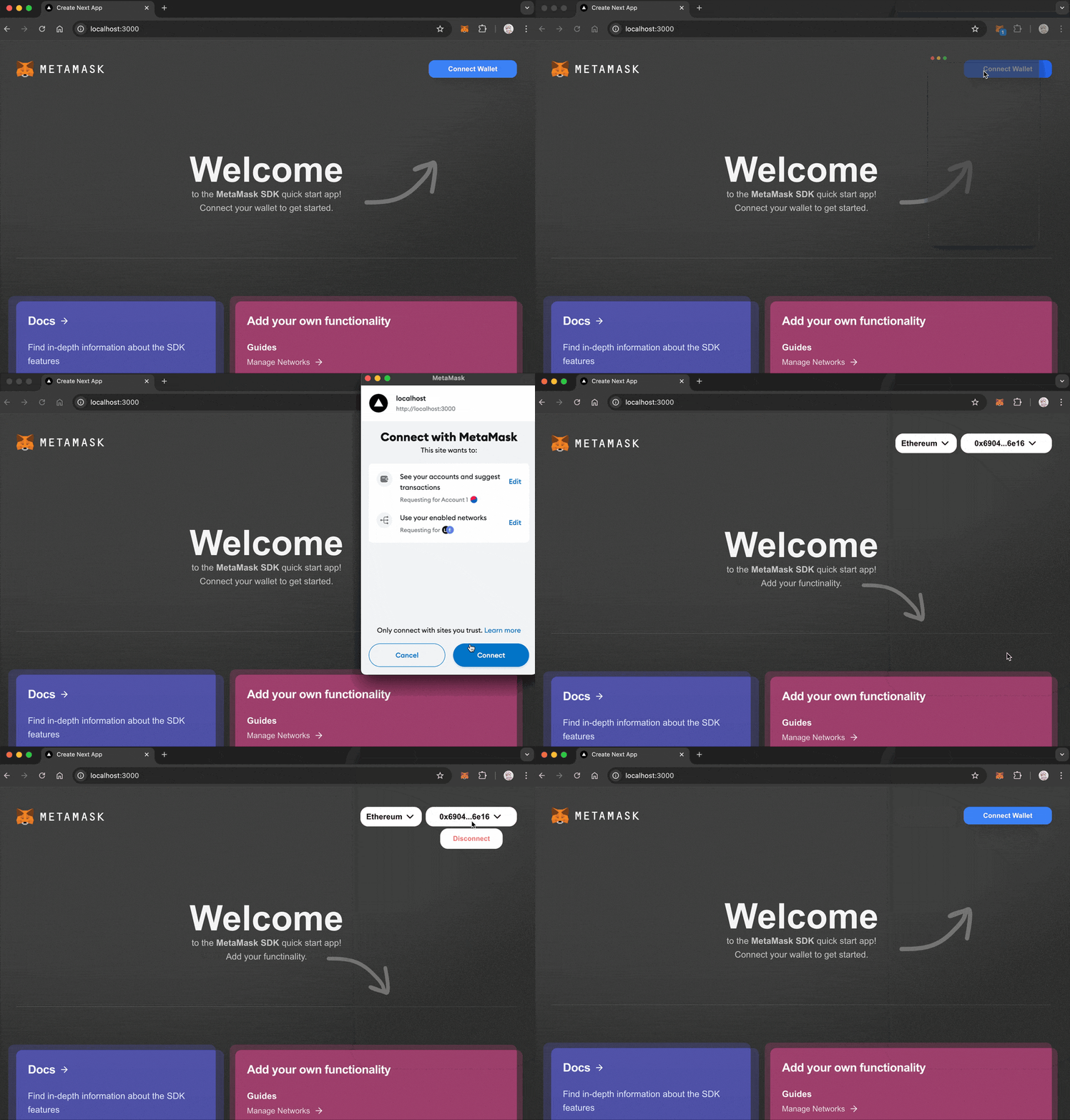
Connect wallet
With Vanilla JavaScript, you can implement user authentication directly using the
eth_requestAccounts RPC method
and accountsChanged provider event.
With Wagmi, you can use provided hooks for handling wallet connections.
- Vanilla JavaScript
- Wagmi
import { createEVMClient } from '@metamask/connect/evm'

const evmClient = createEVMClient()
const provider = evmClient.getProvider()

// Connect wallet
async function connectWallet() {
  try {
    // Disable button while request is pending
    document.getElementById('connectBtn').disabled = true

    const accounts = await provider.request({
      method: 'eth_requestAccounts',
    })

    const account = accounts[0]
    console.log('Connected:', account)

    // Update UI
    document.getElementById('status').textContent = `Connected: ${account}`
    document.getElementById('connectBtn').style.display = 'none'
    document.getElementById('disconnectBtn').style.display = 'block'
  } catch (err) {
    if (err.code === 4001) {
      console.log('User rejected connection')
    } else {
      console.error(err)
    }
  } finally {
    document.getElementById('connectBtn').disabled = false
  }
}

// Disconnect wallet
async function disconnectWallet() {
  try {
    await evmClient.terminate()
  } catch (err) {
    console.error('Error with disconnecting:', err)
  }
}

// Handle account changes
provider.on('accountsChanged', accounts => {
  if (accounts.length === 0) {
    // User disconnected
    document.getElementById('status').textContent = 'Not connected'
    document.getElementById('connectBtn').style.display = 'block'
    document.getElementById('disconnectBtn').style.display = 'none'
  } else {
    // Account changed
    document.getElementById('status').textContent = `Connected: ${accounts[0]}`
  }
})
Display connect and disconnect buttons in HTML:
<div>
  <div id="status">Not connected</div>
  <button id="connectBtn" onclick="connectWallet()">Connect MetaMask</button>
  <button id="disconnectBtn" style="display: none" onclick="disconnectWallet()">Disconnect</button>
</div>
import { useAccount, useConnect, useDisconnect } from 'wagmi'

function ConnectWallet() {
  const { address, isConnected } = useAccount()
  const { connectors, connect, isPending } = useConnect()
  const { disconnect } = useDisconnect()

  if (isConnected) {
    return (
      <div>
        <div>Connected to {address}</div>
        <button onClick={() => disconnect()}>Disconnect</button>
      </div>
    )
  }

  return (
    <div>
      {connectors.map(connector => (
        <button key={connector.uid} onClick={() => connect({ connector })} disabled={isPending}>
          {isPending ? 'Connecting...' : `Connect ${connector.name}`}
        </button>
      ))}
    </div>
  )
}
Wagmi provides a dedicated hook for handling account lifecycle events:
import { useAccountEffect } from 'wagmi'

function WatchAccount() {
  useAccountEffect({
    onConnect(data) {
      console.log('Connected!', {
        address: data.address,
        chainId: data.chainId,
        isReconnected: data.isReconnected,
      })
    },
    onDisconnect() {
      console.log('Disconnected!')
    },
  })

  return <div>Watching for account changes...</div>
}
Connect and sign
You can use MM Connect's connectAndSign method to request wallet access and sign a message in a single user interaction.
For example:
import { createEVMClient } from '@metamask/connect/evm'

const evmClient = createEVMClient()

async function handleConnectAndSign() {
  try {
    const signature = await evmClient.connectAndSign({ msg: 'Hello in one go!' })
    console.log('Signature:', signature)
  } catch (err) {
    console.error('Error with connectAndSign:', err)
  }
}

document.getElementById('connectSignBtn').addEventListener('click', handleConnectAndSign)
The following HTML displays a Connect & Sign button:
<button id="connectSignBtn">Connect & Sign</button>
This one-step flow is unique to MM Connect's connectAndSign method.
It's not part of Wagmi or other wallet libraries.
Best practices
Follow these best practices when authenticating users.
User interaction
- Only trigger connection requests in response to user actions (like selecting a button).
- Never auto-connect on page load.
- Provide clear feedback during connection states.
Error handling
- Handle common errors like user rejection (code
4001). - Provide clear error messages to users.
- Fall back gracefully when MetaMask is not installed.
Account changes
- Always listen for account changes.
- Update your UI when accounts change.
- Handle disconnection events.
Chain support
- Listen for network/chain changes.
- Verify the current chain meets your requirements.
- Provide clear messaging when users need to switch networks.
Learn how to manage networks.
Common errors
The following table lists common authentication errors and their codes:
| Error code | Description | Solution |
|---|---|---|
4001 | User rejected request | Show a message asking the user to approve the connection. |
-32002 | Request already pending | Disable the connect button while the request is pending. |
-32603 | Internal JSON-RPC error | Check if MetaMask is properly installed. |
Next steps
See the following guides to add more functionality to your dapp: